The unit tests were passing. The application was deployed. I could open the domain, sign in, and use the app.
Which sounds like a very comfortable place to be, until someone asks whether we have actually tested every feature.
At that point, Primap had accumulated 49 closed GitHub issues, representing roughly 40 user stories once related work was grouped together. We had a single demo administrator and several demo volunteer accounts, so nothing was stopping us from testing the workflows ourselves. We could join walks, cancel them, submit reports, upload photos, approve accounts, download exports, and repeat the whole thing with another user.
Nothing except the amount of time that would take. And, knowing myself, the very real possibility that I would click through the obvious happy paths, get distracted halfway through, and forget to test something considerably more important than whether a button looked clickable.
So I gave my CLI agent a different kind of job:
Use the deployed application, test its implemented features, and leave behind enough evidence that I can tell what actually works.
That eventually became a workflow involving Playwright, parallel Codex agents, a symbol graph, and a GitHub issue that served as the testing record across sessions. My role became deciding the boundaries and helping with the few things the agents could not independently verify.
Beyond Unit Tests
In my earlier RafflesGo post, I wrote about building software for the Raffles' Banded Langur Working Group's citizen science programme. The project mattered because the workflow belonged to real organisers and volunteers, and our team was selected for continued follow-up after the semester.
Primap is part of that continued work toward an application volunteers can actually use. The practical concern had shifted from satisfying a submission rubric to preparing the deployed system for volunteer testing.
That makes acceptance testing much less optional. A volunteer returning from a survey walk should be able to save their observations, attach supporting media, and submit the report. If connectivity disappears halfway through, the application needs to handle that sensibly too. A passing test suite is useful, but I still wanted evidence that these workflows survived the actual deployment, permissions, storage configuration, and browser state.
The gap became particularly obvious around report submission. The application could have a reasonable TypeScript action and passing tests while the deployed database's row-level security policy rejected the real transition from draft to submitted. That is exactly what happened in one of the tests run by my agents. But I'm getting ahead of myself.
Basically, a closed feature issue tells me somebody implemented something, but it does not tell me that a volunteer can complete the whole flow today.
The Testing Workflow
A CLI agent can read a component and tell me what its button is supposed to do. But I needed it to interact with the rendered application and inspect the result.
This was where Playwright became incredibly useful. It gave the agent a way to locate buttons and labelled inputs, fill forms, upload synthetic files, observe navigation, and inspect the resulting page. The browser became another tool the agent could operate from the CLI.
The agent set up a local browser-testing environment and used the demo accounts against the deployed domain. I provided the login details privately, with explicit instructions to keep them out of source files, committed scripts, GitHub updates, and published artifacts. Temporary browser state and raw downloads also needed to be treated as private material; an innocently named screenshot or export can contain account details too.
I also made the scope explicit. The agents could use clearly marked synthetic fixtures and perform bounded, reversible account changes where appropriate. They were not being handed permission to delete survey cycles, which would cause issues for the remaining testers still in the loop.
This distinction mattered because we were testing the deployed application. A browser action can change actual server state, and some actions send emails immediately. The account being a demo account does not make every possible side effect harmless.
Once that setup existed, the agent could do much more than inspect a screenshot. It could save a draft, reload it, open the same report as another participant, simulate losing connectivity, reconnect, and check whether the data appeared in a fresh online session.
That last step became a recurring theme: the result had to survive beyond the browser state that created it.
The GitHub Checklist
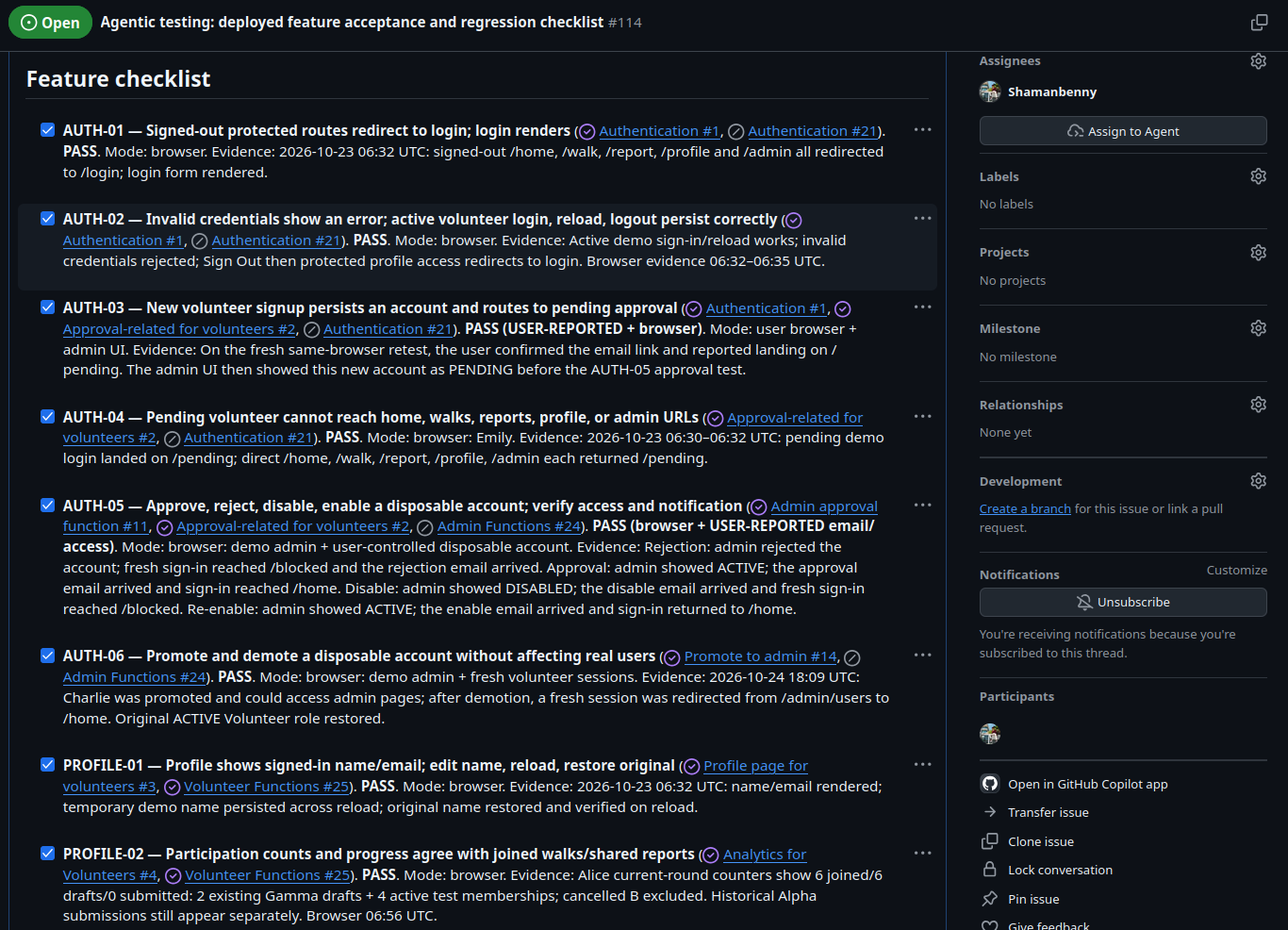
Before running a large batch of tests, I asked the main agent to create a GitHub issue to serve as a feature acceptance checklist.
The checklist mapped the implemented requirements, gathered from the closed issues, to identifiable cases covering report submission, offline reconnection, and incident media uploads. It also separated unfinished requirements from features we could reasonably expect to work. A schema for a future workflow is not the same thing as an implemented interface that can be tested through the browser.
Each case needed a status, its prerequisites, the expected behaviour, and evidence of what actually happened. A checkbox could only be checked once the relevant acceptance conditions had been exercised. Partial evidence remained partial.
I also asked the agent to update each result as soon as it had been tested, rather than waiting until the end to produce one enormous report. Timestamped milestone notes captured the fixture, steps, observations, and remaining work. That made the issue useful when a session ran out of context or another agent needed to continue a test.
This sounds like fairly ordinary project administration. It turned out to be one of the most useful parts of the workflow.
Without that record, every new session would need to reconstruct which account joined which walk, which report had been submitted, and whether an email had actually arrived. With it, the next agent could inherit the testing state instead of inheriting a vague instruction to "continue testing."
I did have to correct the reporting format when it started drifting. Keeping one standard across the checklist and milestone entries made it much easier to compare results and notice missing evidence.
Parallel Agents
Once the first tests were working, I asked the main agent to delegate independent cases to testing subagents.
I continued talking to the main agent. It handled the assignments, received the results, and updated GitHub itself. The testing agents did not all compete to edit the same issue description.
The division of responsibility looked roughly like this:
| Role | Responsibility |
|---|---|
| Me | Define scope, provide approved accounts, clarify requirements, confirm external effects such as email receipt |
| Main agent | Assign tests and fixtures, manage dependencies, review evidence, maintain the checklist, create bug issues |
| Testing subagents | Exercise their assigned flows in Playwright and return observations with evidence |
| Diagnostic agent | Investigate a reproduced failure using the graph, source, history, and deployed evidence |
The difficult part was making the work independent.
Playwright browser contexts separate cookies, local storage, and session state. That lets two volunteers use the application independently within the browser setup. But separate browser contexts still talk to the same deployed database. If two agents edit the same shared report, they can interfere with each other perfectly well from their beautifully isolated browsers.
The main agent therefore had to allocate the actual test data as carefully as the browser sessions. That meant separate synthetic walks or reports, dedicated temporary artifact directories, explicit account assignments, and clear rules about which records each agent could change. Read-only cases were easier to parallelise; cases depending on another test's mutation had to wait.
The more precise those instructions became, the less I needed to intervene between actions. Parallel testing was useful because the coordinator knew what each agent owned and which actions had to remain sequential.
Reporting Bugs
Whenever a test failed, I asked the main agent to create one GitHub issue for that failure, including the setup, reproduction steps, expected result, actual result, and sanitized evidence. The acceptance checklist linked back to it. Diagnosis and a proposed fix could then stay with the same bug instead of disappearing into a separate conversation.
For example, the walk date filter hid a walk from a volunteer who had already joined it, while another volunteer could still see it. The issue captured the comparison between both sessions and the direct detail-page check, making the failure reproducible without needing the original conversation.
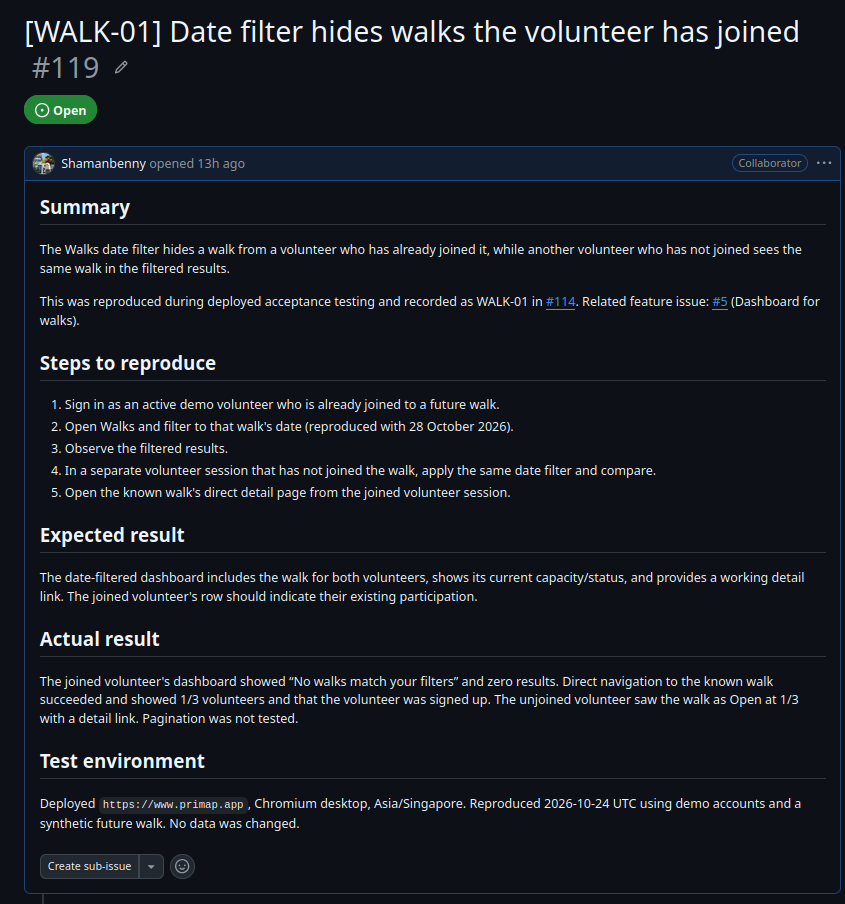
The bug report for the walk date filter. Its reproduction steps preserve the useful result of the browser test.
Debugging with Atomic
Browser evidence tells us that a flow failed. Understanding why can still require a lot of repository exploration.
My internship at Synapxe had already given me an appreciation for symbol graphs when navigating larger repositories. That experience became relevant here because a feature rarely lives in one file. A report form might call a server action, which writes to tables governed by policies and triggers, while a separate component manages media and an offline queue.
Without a map, an agent can spend a substantial amount of its context budget opening files, following imports, searching for callers, and rereading code another session already explored. The immediate tool output takes tokens, and retained excerpts compete with the actual debugging evidence for space in the conversation.
Nicola, the creator of vexp, discusses this exploration overhead in his article on how "90% of Claude Code Tokens Are Wasted on Exploration". The article argues for dependency-aware context retrieval instead of broad file reading. What I wanted was practical:
Give the agent a way to find the connected symbols first, then read the relevant implementation.
That led me to Atomic Claude. Its source repository and code-intelligence documentation describe a symbol graph covering definitions, imports, and call relationships, with commands for exploration, callers, callees, and change impact.
The workflow was built around Claude Code, while I was using Codex. I inspected the source, adapted the relevant skills and command instructions for my Codex environment, installed the standalone atomic CLI, and indexed Primap. This was an adaptation of the useful pieces, rather than an assumption that every Claude-specific integration would work unchanged.
The navigation tools then looked like this:
atomic --no-update-check code index
atomic --no-update-check code explore "walk date filter"
atomic --no-update-check code callees --depth 2 --json WalkPage
atomic --no-update-check code sync
The graph helped allow agents to narrow where to look. The source file itself still mattered for establishing exactly what the code did, and deployed behaviour still mattered for establishing what users experienced. A graph cannot prove that a database policy changed through a dashboard matches the repository. It also needs refreshing after code changes.
For the walk date filter bug, the graph helped locate the page that separated joined walks from available walks. Reading that code revealed an empty-state check that considered only available walks, hiding valid joined results.
Model Selection
The testing subagents mainly needed to follow a bounded protocol, operate Playwright, and return reliable observations. That was where GPT-6-Luna with medium reasoning fit into my setup.
Once a failure was reproduced, I could give the associated issue to a model such as GPT-6.1-Sol at a higher reasoning setting for the more demanding investigation: form hypotheses, trace the relevant flow through Atomic, inspect the source and Git history, and propose a fix with an appropriate regression check.
The bug issue provided the handoff. It already explained what happened and how to reproduce it, so the diagnostic agent could start from evidence rather than inventing its own version of the problem.
I still wanted the investigation to distinguish a confirmed source defect from a suspected production cause. Browser failures can come from application code, deployed configuration, stale state, or even a mistake in the test harness. Giving an agent a graph helps it investigate those possibilities; it does not remove the need to test its explanation.
The follow-up investigation of the walk date filter shows what that handoff produced. The investigation traced how joined and available walks were separated, identified an empty-state condition that ignored valid joined results, and recorded a local reproduction alongside the proposed fix. It also stated that the exact deployed commit remained unverified.
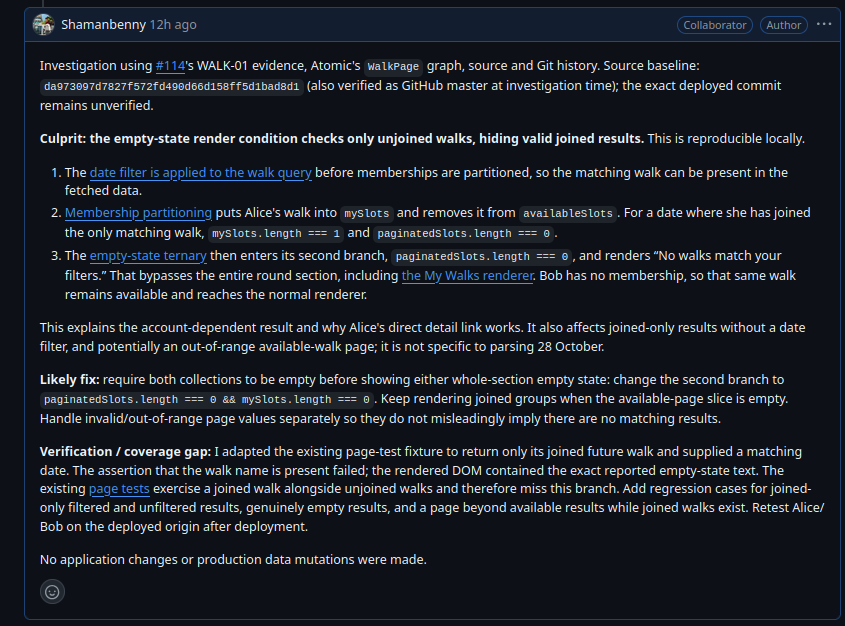
The source-linked investigation stays in the same bug report, with the diagnosis, likely fix, verification, and remaining coverage gaps together.
Human Input
Email was the clearest boundary.
The agents could create the right conditions for a reminder or cancellation update, perform the relevant action, and verify the resulting application state. They could not independently confirm delivery to an inbox they could not access.
For those cases, I supplied a controlled inbox, opened confirmation links, reported where sign-in landed, and checked the actual emails.
The checklist recorded those results as user-reported mailbox evidence alongside browser evidence. A successful action or an email-sending function in the source was not enough to claim delivery.
There were other moments for human input too: clarifying the intended requirement, supplying a downloaded export, or authorizing a narrowly scoped admin action. I still owned those decisions. The improvement was that I could respond at these specific boundaries instead of personally conducting every step of every test.
Results
The bulk of the browser testing and initial bug discovery fit into roughly a day of focused work , with follow-up sessions for fixes, retests, and inbox-dependent checks. The GitHub record spans those sessions, so I would not describe every last confirmation as having happened in one uninterrupted day.
By the 25 October snapshot, the checklist contained 49 cases: 39 passed, eight failed, and two remained source-only checks for partially implemented requirements. The failures stayed visible and unchecked, with evidence and follow-up work, rather than being hidden behind a general statement that the application had been tested.
For our team of five, I could easily imagine this taking a working week to coordinate, execute, compare, and document manually. That is my estimate of the effort we avoided, rather than a controlled productivity benchmark. The concrete result was a much clearer picture of the deployed application and a set of reproducible issues we could act on before asking volunteers to use it.
The same setup could target a local development server, with disposable data making more aggressive tests easier to contain. In this case, the deployed environment was the point: I wanted to know whether the app volunteers would reach behaved as expected.
The goal was never to declare that agents had proved Primap bug-free. It was to make a broad acceptance pass practical, catch significant failures, and leave behind enough evidence for the next person to continue.
That feels like a useful continuation of the original RafflesGo project. We had already spent a semester thinking about what volunteers and organisers needed. This workflow helped me check whether the application was actually delivering it, without spending the whole day clicking through the same forms myself.