PeerPrep was built as part of NUS CS3219, but the interesting part of the project was never just the final feature list. It was a practical software engineering exercise in turning a fairly simple product idea, a peer-to-peer technical interview practice platform, into a system that could support real-time matching, collaborative coding, session history, authentication, and administration without collapsing into one tightly coupled application.
For most early software projects, a monolith or modular monolith is the natural starting point. It is intuitive, feature-focused, and usually the fastest way to get a working system off the ground. The trouble only becomes visible a few features later: one interface is introduced for a single use case, the next feature needs to call it with a caveat, then another feature adds a slightly different assumption, and before long the system is held together by a web of interfaces that all technically work but no longer fit together cleanly. That is what makes this project worth documenting. PeerPrep became a useful case study in how early architectural decisions can reduce the long-term cost of maintenance, extension, and deployment once the system begins to grow beyond its first clean draft.
This post follows that progression as an engineering story rather than a demo walkthrough. It starts with the front-end workflow and ownership model that shaped the initial system boundaries, then moves into the microservice split, and finally into the AWS deployment decisions, scaling tradeoffs, and cost consequences that came from those earlier choices.
UI/UX Design Specification
Every full-stack project starts with its first design input. For PeerPrep, it was not a blank Figma canvas, but rather an existing UI/UX reference that already had a visual tension worth analysing: a Bill Splitter mobile app concept by Waqar Ahmed, which served as the design seed for this phase of the project.
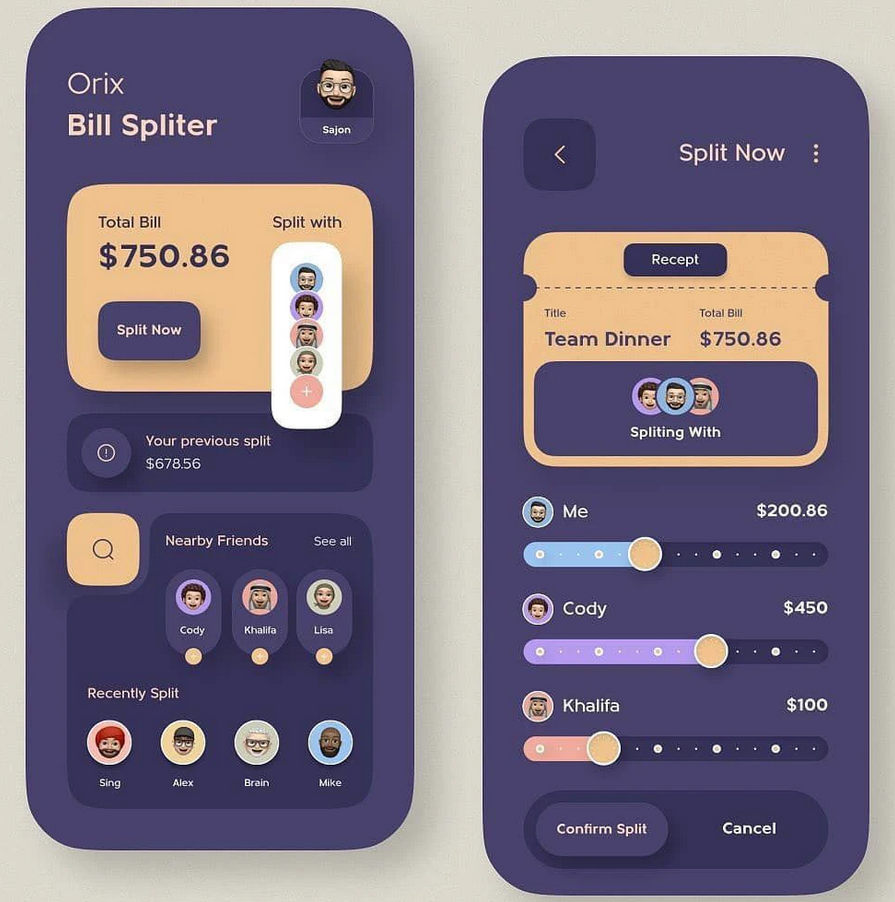
What stood out immediately was the accent treatment. The warm peach against the dark shell gave the interface a strong product identity, with a typography that fits cleanly for a minimalistic app. What did not translate as well was the heavy use of deep blue as the dominant page background. For a collaborative practice platform where users might stay in matching queues and stare at an editor for extended periods, that full-screen darkness felt too jarring. The design direction that followed was therefore selective rather than imitative: keep the accent contrast, keep the strong rounded component language, but move the overall product onto a softer neutral base.
That judgment call was passed into Figma Make together with the existing Software Requirements Specification (SRS). Instead of asking it to reproduce the reference, the prompt framed it as a co-designer: extract the palette accents, infer a suitable typography direction, preserve the rounded interaction language, and reinterpret those choices around PeerPrep's actual page responsibilities: authentication, dashboard preference selection, matching status, collaboration, profile/history, and admin flows. The useful outcome was not a final screen-perfect design, but a reusable component vocabulary that could survive implementation.
These kinds of design component specification helps to ensure that independent feature development does not halt everytime new UI features are required by the team. By locking in the major visual primitives early enough, page implementation could stay coherent even as feature detail evolved separately. That distinction mattered as it meant that the final product can still looks recognizably like the original mockup language, but smaller decisions continued to move during development as new features appeared and the team used the system internally.
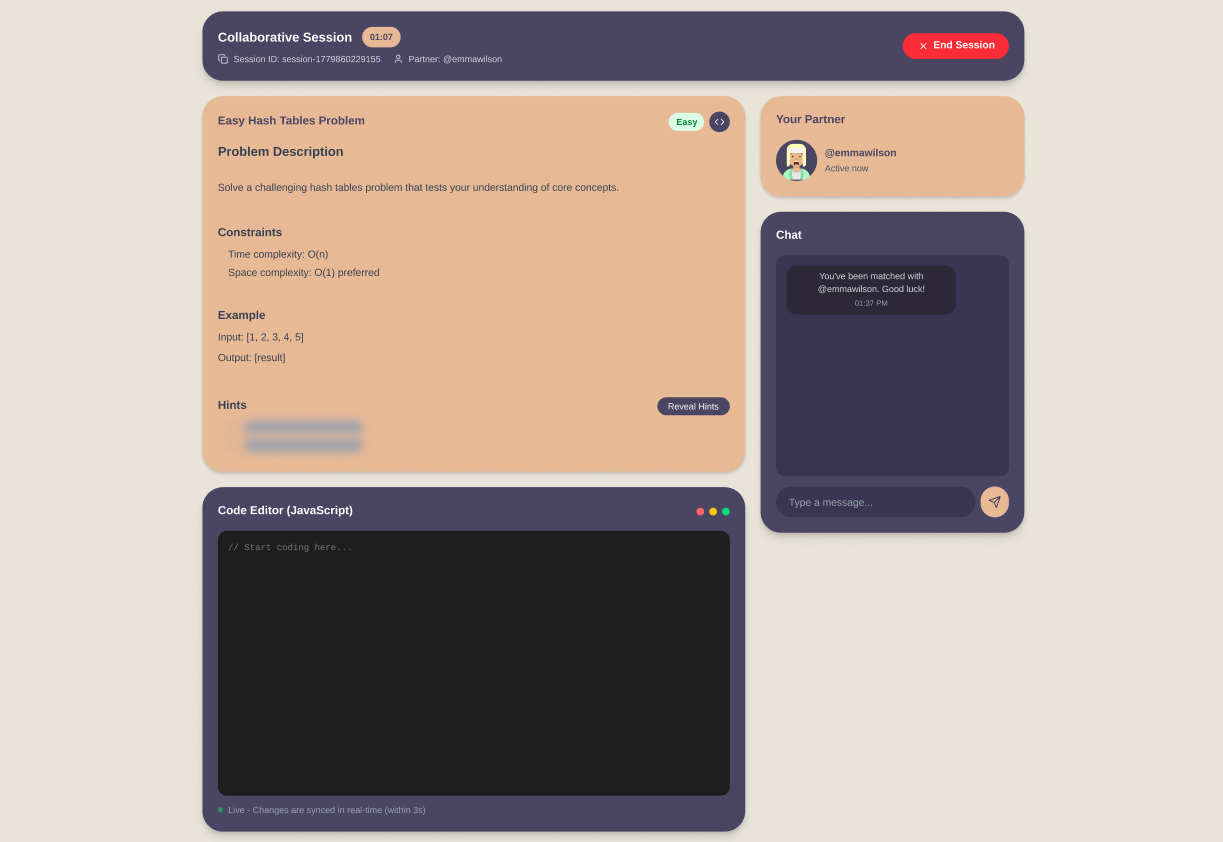
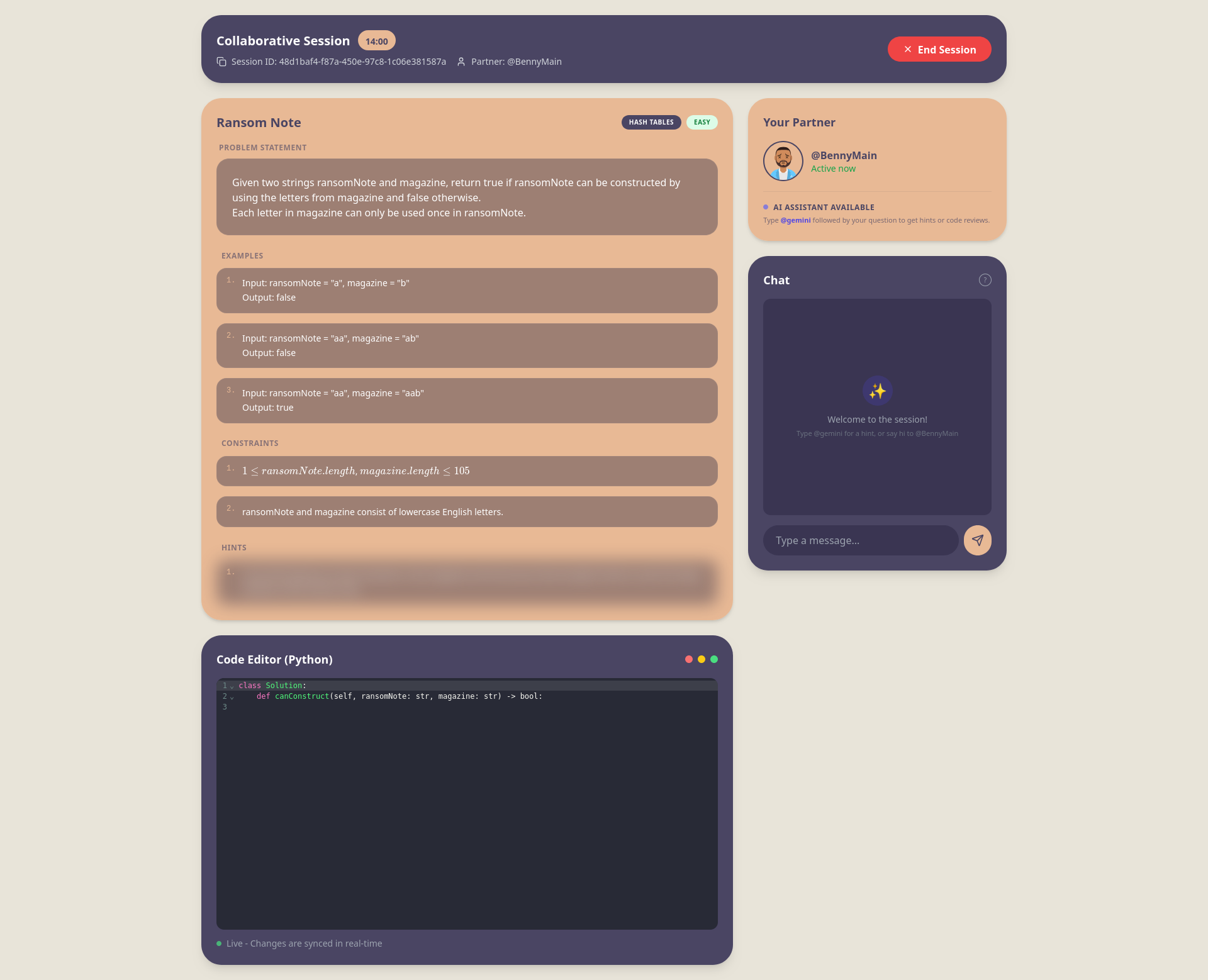
In this image comparison, the left side shows the original mockup generated by Figma Make, while the right side shows the final UI screenshot from the implemented project.
This comparison should give you a rough idea on how the major components remain stable: the button language, the card shapes, the chatbox, the dark collaboration surfaces, and the generated avatars all survive from mockup to final implementation. What changed are the details that only become obvious once the system is actively being smoketested by the team. The AI assistant feature and the syntax highlighting for code editor are few examples of such adjustments made through internal usage feedback rather than through the initial mockup alone.
Why Microservices Fit PeerPrep
For non-technical readers: a microservice architecture aims to build a product as a set of smaller back-end services, where each service is responsible for one specific job and communicates with the others over defined interfaces.
Microservices were not the only possible architecture for PeerPrep, and for a smaller student project a monolith would have been the more obvious default. What made the split feel justified here was the shape of the product itself. The vision we had for PeerPrep had already covered multiple different responsibilities at once: handling user identity, storing and retrieving interview questions, matching users into pairs, running a live collaborative editor and chat, saving session history, and exposing an optional AI helper on top.
Once those responsibilities were listed out plainly, forcing them into one backend started to look less elegant than it sounded. The matching flow did not behave like question management, and the collaboration flow definitely did not behave like account management. Splitting services was therefore less about chasing a fashionable architecture and more about keeping each part of the system responsible for one kind of work.
| Boundary | Responsibility | Why it should be separate |
|---|---|---|
| API Gateway | Authentication, request routing, session orchestration | Keeps the frontend talking to one public entry point instead of knowing every internal service |
| User Service | Profile data, roles, account state | User lifecycle changes should stay isolated from questions, matching, and collaboration |
| Question Service | Topics, difficulties, question retrieval | Question-bank logic evolves separately from live session logic |
| Matching Service | Queueing and peer pairing | Matching is its own flow, backed by Redis queues and timeout tracking |
| Collaboration Service | Yjs editor sync, chat, active session state | Real-time collaboration needs persistent connections and short-lived shared state |
| History Service | Session attempts and review records | Quite literally serves as a historical snapshot of a user's attempts |
| AI Service | On-demand assistance | Optional AI requests are bursty and should not put pressure on the core practice flow |
It would have been reasonable to merge the History Service with the Question Service, since the two touch closely related information. The team decided to kept them separate because history is better treated as a saved snapshot of an attempt, not as an extension of the question bank itself. That avoids tighter deletion dependencies, and it also keeps the Question Service reusable in other contexts where session history may not even be needed.
Parallel development became easier
This separation also fit the way the project was built as a CS3219 team assignment. Once the service boundaries were clear, different members could work on user management, matching, question management, collaboration, and UI with much less risk of stepping on the same backend logic every code change. That did not eliminate coordination entirely, but it kept coordination focused on interfaces between services rather than on one large shared codebase where every new feature could quietly affect everything else.
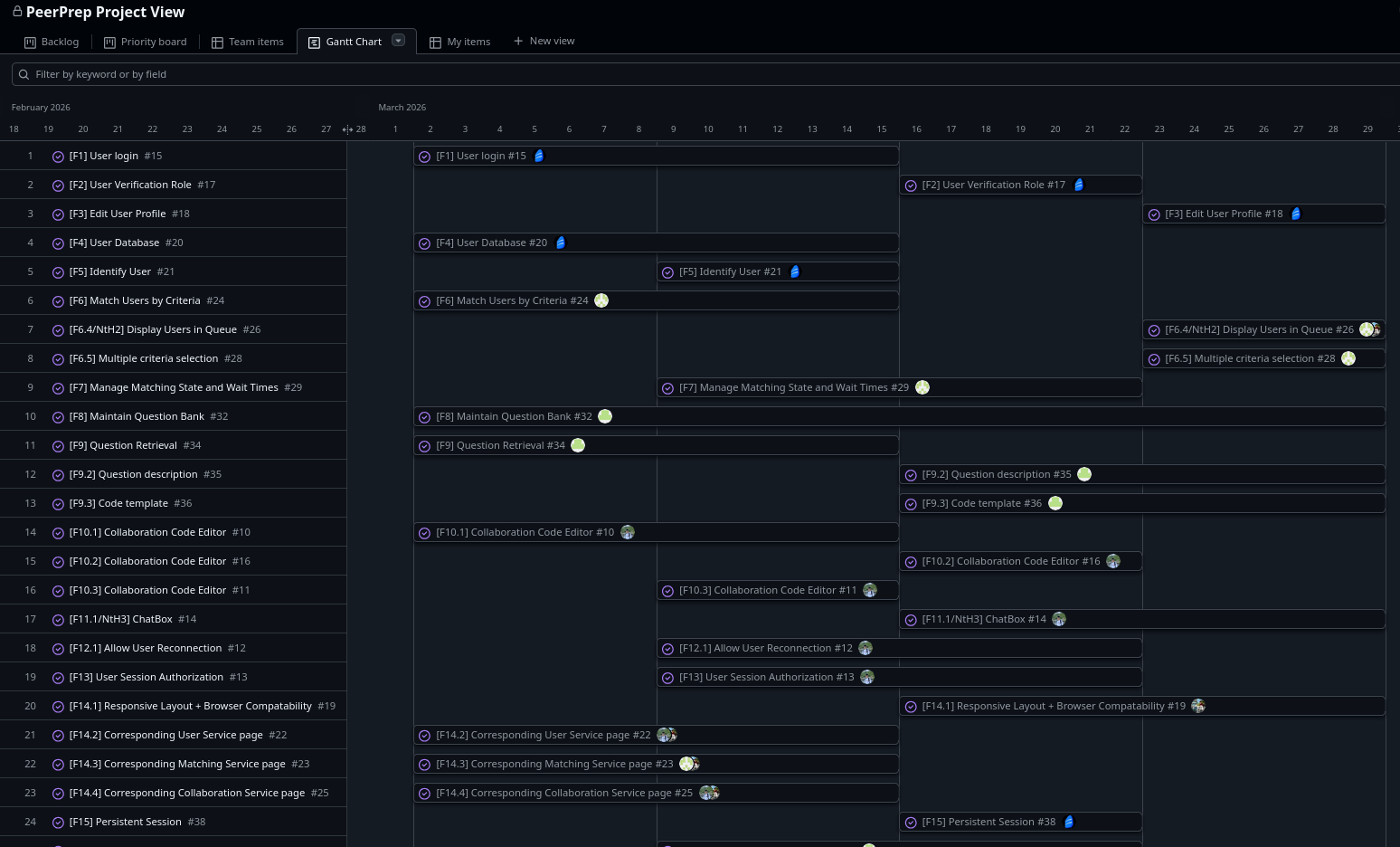
As the Gantt chart above shows, team parallelism was not just a theoretical benefit of the architecture but something that shaped the project timeline directly. Different members were able to move on their respective milestones in the same sprint cycle without constantly blocking one another on a single shared backend. In practical terms, that compressed what could easily have become a much longer sequential build into roughly four weeks of parallel implementation, leaving the remaining time for smoketesting, debugging, and refinement.
In practice, that made the architecture useful long before deployment entered the picture. The team could discuss APIs, Redis keys, and service responsibilities in smaller pieces, test milestone work in isolation, and make changes inside one domain without reopening the entire backend. For a project that had to grow feature by feature under assignment deadlines, that was a very practical benefit.
AWS Deployment
Once the services were split by responsibility, deployment stopped being "where do we host the app?" and became "which services belong on which infrastructure?". The frontend was static. The user, question, history, and AI services behaved like low-volume request-response APIs. The matching service kept users waiting in a live queue, while the collaboration service needed persistent real-time connections for Yjs synchronization and chat. That difference in runtime behavior is what made independent scaling worth taking seriously in the first place.
The final AWS design therefore grew out of workload shape rather than out of a desire to use as many services as possible. CloudFront became the public front door for everything: static assets were served from S3, regular API traffic was routed into AWS API Gateway, and the real-time collaboration paths were forwarded to an Application Load Balancer. From there, each backend service could be deployed into the environment that best matched how it actually behaved.
| Component | Deployment choice | Reasoning to explain |
|---|---|---|
| Frontend | S3 + CloudFront | A Vite React app is static by nature, so it benefits more from cheap storage and CDN delivery than from always-on compute |
| API Gateway layer | API Gateway + Lambda container | The public API surface needed centralized routing and auth, but not a permanently running server |
| User, Question, History, AI | Lambda container functions | These services are bursty and mostly idle between requests, so per-request compute kept them cheap without much operational cost |
| Matching | ECS on EC2 behind ALB | Queue polling and long-lived matching flows behave more like a resident service than a short request |
| Collaboration | ECS on EC2 behind ALB | WebSockets, Yjs sync, and chat require stable long-running connections that fit a container service better |
| Redis | ElastiCache | Shared ephemeral state was needed for matching, session tickets, auth invalidation, and collaboration coordination |
| Database | Firestore | The existing data layer was already built around Firebase and Firestore, so AWS hosted the compute and networking around it rather than replacing it |
One consideration for improvement is to use VPC Endpoints + Lambda instead of Amazon API Gateway + Lambda, since it only defaults all API calls to our
api-gatewayLambda.
Seen this way, the AWS section is not a separate deployment story at all. It is the architectural argument from earlier, carried one step further: once services are allowed to behave differently, infrastructure has to acknowledge those differences too.
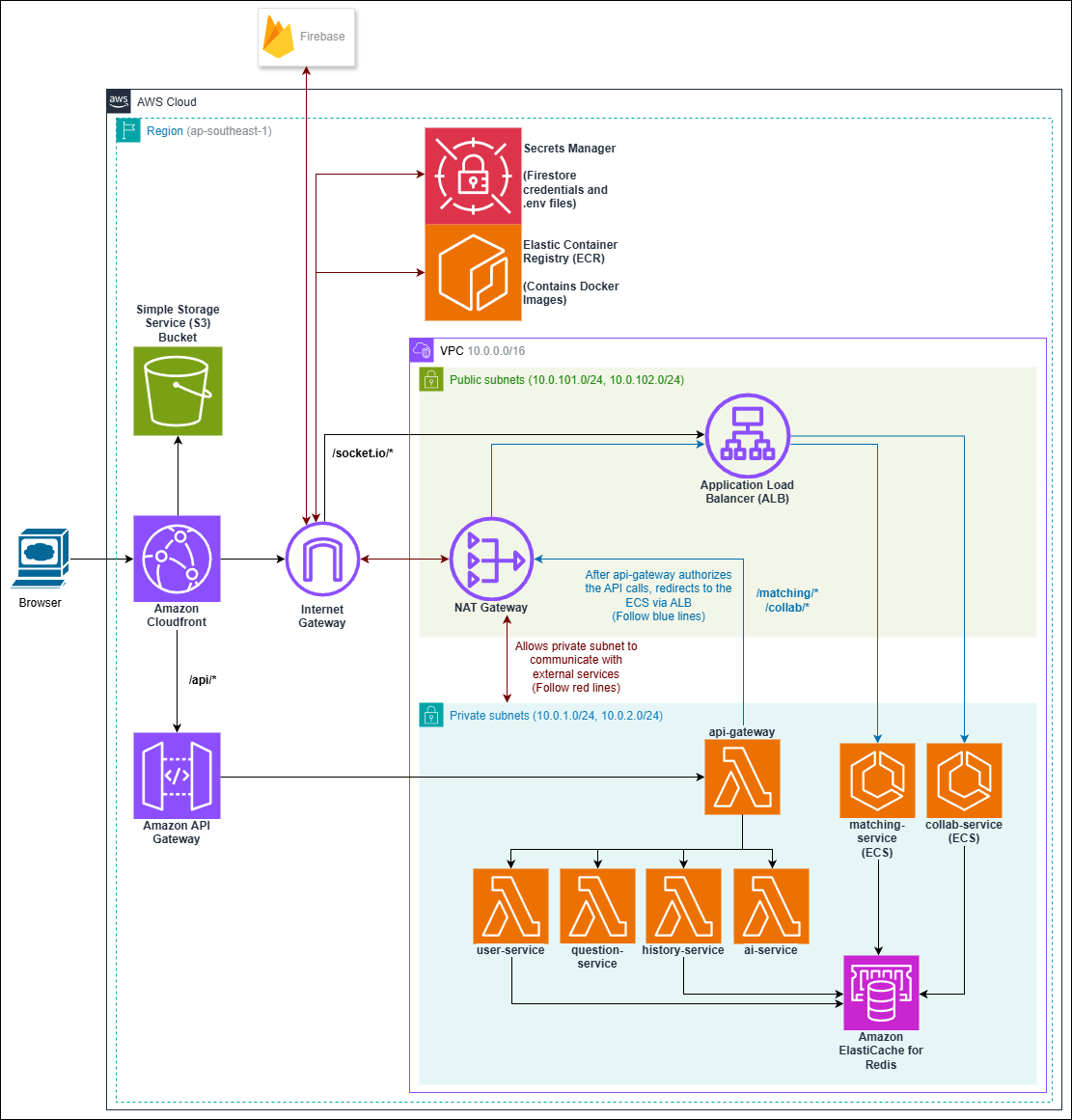
Designed using Draw.io during the team's deployment planning phase.
Trade-Offs between AWS Resources
The cleanest fit for PeerPrep's stateless services was Lambda. User management, question retrieval, history writes, and AI assistance were all request-driven and intermittent. They did not justify permanently running containers, especially for a student project that would spend most of its time idle outside demos, grading, or team testing. Even the internal API Gateway logic could live comfortably in a Lambda container because its job was mostly to validate tokens, route requests, and orchestrate service calls.
That same logic broke down for matching and collaboration. Matching users meant holding a live queue and supporting long-lived polling behavior while users waited for a partner. Collaboration was even more demanding: it needed WebSocket connectivity, Yjs synchronization, shared Redis-backed session state, and predictable runtime behavior while a session was active. As such, matching and collaboration were not realistic candidates for Lambda at all. With Lambda’s execution model and 15-minute runtime limit, those services were far better suited to long-running ECS tasks behind an ALB.
| Option | Good fit | Weak fit | PeerPrep decision |
|---|---|---|---|
| Lambda | Request-Response APIs, bursty work, zero-cost idling | Cold starts, execution limits, awkward persistent connections | Used for user, question, history, AI, and gateway containers |
| App Runner | Simple container web apps with managed scaling | Less future-proof after AWS closed it to new customers on April 30, 2026 and moved it into maintenance | Mention as an option that became less attractive due to its availability change |
| ECS | Long-running services, WebSockets, SSE, custom networking | Baseline cost remains even when idle | Used for matching and collaboration |
App Runner sat in the middle as a conceptually attractive option because it promised container simplicity without asking the team to manage ECS directly. The problem was timing. By the time these deployment decisions solidified, App Runner had become a less stable long-term choice for new projects, so it stopped looking like a sensible foundation to build around. That left the architecture with a clearer split: Lambda for the bursty request-response paths, ECS for the long-running stateful ones.
The Lambda choice did carry a visible trade-off. Under sustained traffic, cold starts can fade into the background, but PeerPrep was not being exercised like a public-scale product. During grading and intermittent testing, those idle gaps made Lambda cold starts easier to notice. That was acceptable in exchange for a much lower idle bill, but it is the kind of trade-off worth documenting honestly rather than hiding behind generic serverless enthusiasm.
Terraform And CLI Model Assisted Deployment
What made this deployment practical to iterate on was not AWS alone, but Terraform. On a fast-moving project timeline, building and adjusting infrastructure manually in the AWS Console would have been too slow and too tedious to sustain. As As the article by Benito Martin notes, manual console provisioning quickly becomes repetitive and error-prone, whereas Terraform lets teams define Infrastructure as Code (IaC) and apply it consistently through the CLI. That mattered here because once the deployment plan was encoded in Terraform, changes became faster to roll out, easier to review, and much less dependent on manual setup. It also made version control far more practical: because the infrastructure existed as code, it could be committed, diffed, reviewed, and pushed to GitHub just like the application itself, rather than being trapped in a sequence of undocumented console actions. terraform plan was especially valuable because it turned each refinement into a concrete preview of what would actually change before anything was deployed.
Now is also the right time to describe the role of CLI model assistance in deployment. The useful part was never "let the model invent the cloud architecture." The useful part was that, after the team had already decided on a rough plan on which cloud resources is necessary and which of those needed to stay private, Terraform gave those constraints a form that could be iterated on with much less guesswork. In other words, the model was helping refine a specification, not replace one.
That distinction matters because infrastructure generation without constraints is exactly how cloud bills become irrational. Left on its own, a tool could easily converge on always-on compute where serverless would have been enough, duplicate NAT gateways where a development setup only needed one, or expose services publicly when they should only be reachable through CloudFront, API Gateway, or the ALB. Terraform was valuable precisely because it made those choices explicit enough to inspect before they turned into running infrastructure.
AWS Monthly Cost Analysis
Once the deployment shape was clear, the cost structure became much easier to understand. The expensive part was not the stateless application logic. It was the baseline infrastructure that had to stay provisioned whether or not anyone was actively using the applications. The single NAT Gateway was one of the clearest examples: it existed to let private resources reach the outside world safely, but it also imposed a steady monthly cost that had little to do with how much PeerPrep was actually used. ElastiCache added another fixed layer, and ECS introduced baseline compute cost simply because the matching and collaboration services had to remain resident.
By contrast, the serverless and static parts of the stack were comparatively gentle. Lambda was billed per request and execution time, S3 storage remained small, CloudFront stayed inexpensive under low traffic, and ECR storage was minor enough to barely register next to the networking baseline. That split is one of the more useful lessons from this deployment: moving bursty services to Lambda does reduce waste, but it does not magically erase the fixed cost of the stateful and networked parts of the system around them.
| Cost Area | Configuration | Estimated Monthly Cost | Notes |
|---|---|---|---|
| NAT Gateway | 1x managed NAT Gateway | ~$43.07 | Largest fixed baseline cost |
| Public IPv4 | 1x Elastic IP for NAT | ~$3.60 | Small on its own, but still persistent |
| ElastiCache | 1x cache.t4g.small Valkey/Redis node | ~$23.36 | Stateful infrastructure that stays provisioned |
| Secrets Manager | 4 secret containers | $1.60 | Low cost, but fixed while deployed |
| ECR Storage | 7 repositories, 21 images at 200 MB each | ~$0.42 | Minor compared to networking and compute |
| ECS on EC2 | 1x t4g.small instance | ~$15.48 | Applies to the always-on stateful path |
| Baseline subtotal | Fixed provisioned infrastructure | ~$87.53 / month | Before traffic-driven costs |
| Lambda | Requests and execution time | Usage-based | Cheap at low-to-moderate traffic, but not free under sustained load |
| CloudFront | Data transfer and request volume | Usage-based | Low under course-project traffic, scales with audience size |
| API Gateway | HTTP API requests | Usage-based | Directly tied to request volume |
| NAT data processing | Outbound traffic through NAT | Usage-based | Separate from the NAT hourly charge |
| S3 / Firestore | Storage and external managed usage | Usage-based | Small in this deployment, but still workload-dependent |
The fixed monthly figures above are taken from
peerprep-g18/docs/deployment/ESTIMATED_PRICING.mdfor the Singapore (ap-southeast-1) region.
The important distinction is that the baseline cost existed even when usage was low, while Lambda, CloudFront, API Gateway, and storage scaled more naturally with actual traffic. That is why the persistent infrastructure, not the serverless layer, dominated most of the cost discussion.
For the purposes of the course project, keeping the deployment cost manageable was part of the requirement, so cheaper infrastructure choices were not just acceptable but often preferable as long as they could be justified clearly. In that sense, cost was itself a valid architectural constraint rather than something separate from the design. If PeerPrep were instead kept online as a longer-running product, or expected to serve much heavier peak-hour traffic, the first parts to revisit would likely be the persistent infrastructure choices rather than the serverless ones. Services such as Lambda can already scale horizontally with much less manual intervention, but Redis sizing, ECS hardware allocation, and NAT-related decisions would need closer tuning to support sustained load reliably. Cost, in other words, did not invalidate the architecture; it helped determine which trade-offs made sense for a course setting and which ones would need to change for production scale.
What The Project Actually Proved
PeerPrep was never interesting because it used microservices, AWS, or Terraform in isolation. What made the project worth documenting was that the decisions stayed connected from start to finish. The design specification reduced UI drift, the team ownership model reinforced cleaner service boundaries, the microservice split made parallel implementation realistic, and the AWS deployment only really made sense because those application boundaries had already been drawn with initial care. Each later decision was not replacing the earlier one. It was inheriting from it.
That is also the more useful takeaway for anyone building a system like this. The first architectural question is usually not "Should this be microservices?" and it is definitely not "Which cloud service should I use?" The better question is whether the product already contains responsibilities that change at different speeds, fail in different ways, or demand different runtime behavior. Once the answer becomes yes, separation stops being an abstract principle and starts becoming an operational advantage. It improves team parallelism, keeps interfaces more honest, and makes cost trade-offs easier to reason about before actual deployment.